The snippet manager for AI agents.
Your AI agent shouldn't guess your production commands.
snip gives Claude Code, Cursor, and any MCP client a verified, safety-checked command library.


Website · Agent Quick Start · Safety Model · Human CLI · Commands · Contributing
AI coding agents are great at writing code and terrible at knowing your commands — the exact deploy script, the migration incantation, the kubectl flags your team actually uses. Left alone, they guess. Guessing at production commands is how incidents happen.
snip is the layer between your agent and your shell:
- Verified — agents pull from a curated library you (or your team) wrote, not from a hallucination.
- Safety-checked — execution is dry-run by default; destructive patterns (
rm -rf,curl | bash, fork bombs…) are hard-blocked. - Team-shareable — commit
.snip/snippets.jsonto your repo and every teammate's agent uses the same code-reviewed commands. - Still a great human CLI — fuzzy search, TUI, templates, multi-language execution. See The human CLI.
# Install
npm install -g snip-manager

# Wire it into your AI client (claude, cursor, goose, continue)
snip mcp install claude

# Give it something verified to work with
snip seed        # or: snip import-history, snip add …
Then, in your agent:
You:    deploy the api to staging

Agent:  → snip_search("deploy staging")
        → found "deploy-api-staging" (author: jane, used 47 times)
        → snip_exec("deploy-api-staging")           # dry-run by default
        Here's exactly what will run: … Confirm?

You:    yes

Agent:  → snip_exec("deploy-api-staging", dry_run: false)
        Deployed. Exit code 0.
And when an agent tries something it shouldn't:
Agent:  → snip_exec("cleanup-old-data", dry_run: false)
        ✗ Blocked: this snippet contains potentially destructive operations.
          Use the CLI directly to confirm execution.
The MCP server exposes 16 tools:
| Tool | Description | Safety |
|---|---|---|
snip_search |
Fuzzy-search by name, tags, or content | Read-only |
snip_searchRelevance |
Search with relevance scores + min_score filter |
Read-only |
snip_list |
List with tag/language/sort/limit filters | Read-only |
snip_read |
Read snippet content + metadata by name | Read-only |
snip_suggest |
Context-aware suggestions from current directory | Read-only |
snip_history / snip_diff |
Version history & diffs | Read-only |
snip_save / snip_edit / snip_rename / snip_delete / snip_undo |
Library management | Write |
snip_share / snip_unshare / snip_discover |
Public Gist sharing & discovery | Write (API) |
snip_exec |
Execute a snippet — dry-run by default | Execute |
Resources: snip://snippets (list) and snip://snippets/{name} (read) for clients that support resource reading.
snip mcp install <client> handles this for you. Manual config, for any MCP client:
{
  "mcpServers": {
    "snip": { "command": "snip", "args": ["mcp"] }
  }
}| Client | Setup |
|---|---|
| Claude Code | snip mcp install claude (uses claude mcp add) |
| Cursor | snip mcp install cursor (writes ~/.cursor/mcp.json) |
| Goose | snip mcp install goose (prints YAML for ~/.config/goose/config.yaml) |
| Continue | snip mcp install continue (prints JSON for ~/.continue/config.json) |
| Anything else | Use the generic command/args config above |
Three layers between an agent and a destructive command:
- Dry-run by default.
snip_execreturns what would run unless the agent explicitly passesdry_run: false. The agent (and you) see the full command content first. - Built-in deny rules. Destructive patterns —
rm -rf,dd of=/,mkfs, fork bombs,curl | bash,chmod 777 /, and more — are detected per-line and blocked over MCP entirely. They can only be confirmed by a human, in the CLI, typingyes. - Full visibility. Every execution returns the exact content and exit code, so agents self-correct instead of retrying blind.
The same detection guards human usage: snip run previews and requires confirmation; snip exec warns and requires --force.
Commit your command library to the repo and every teammate — and every teammate's agent — uses the same verified commands:
snip team init            # creates .snip/snippets.json
snip team add deploy-api  # share a snippet (records author from git config)
snip team sync            # import the team library locally
snip team status          # compare team vs local
New snippets arrive via pull request, which means your agent's command vocabulary is code-reviewed. No sync server, no accounts — git is the backend and your data never leaves your repo.
snip started life as a terminal-native snippet manager, and it's still one — fuzzy search, split-pane TUI, {{var:default}} templates, and direct execution across any language (shell, JS/TS, Python, Ruby, PHP, Perl, PowerShell…).
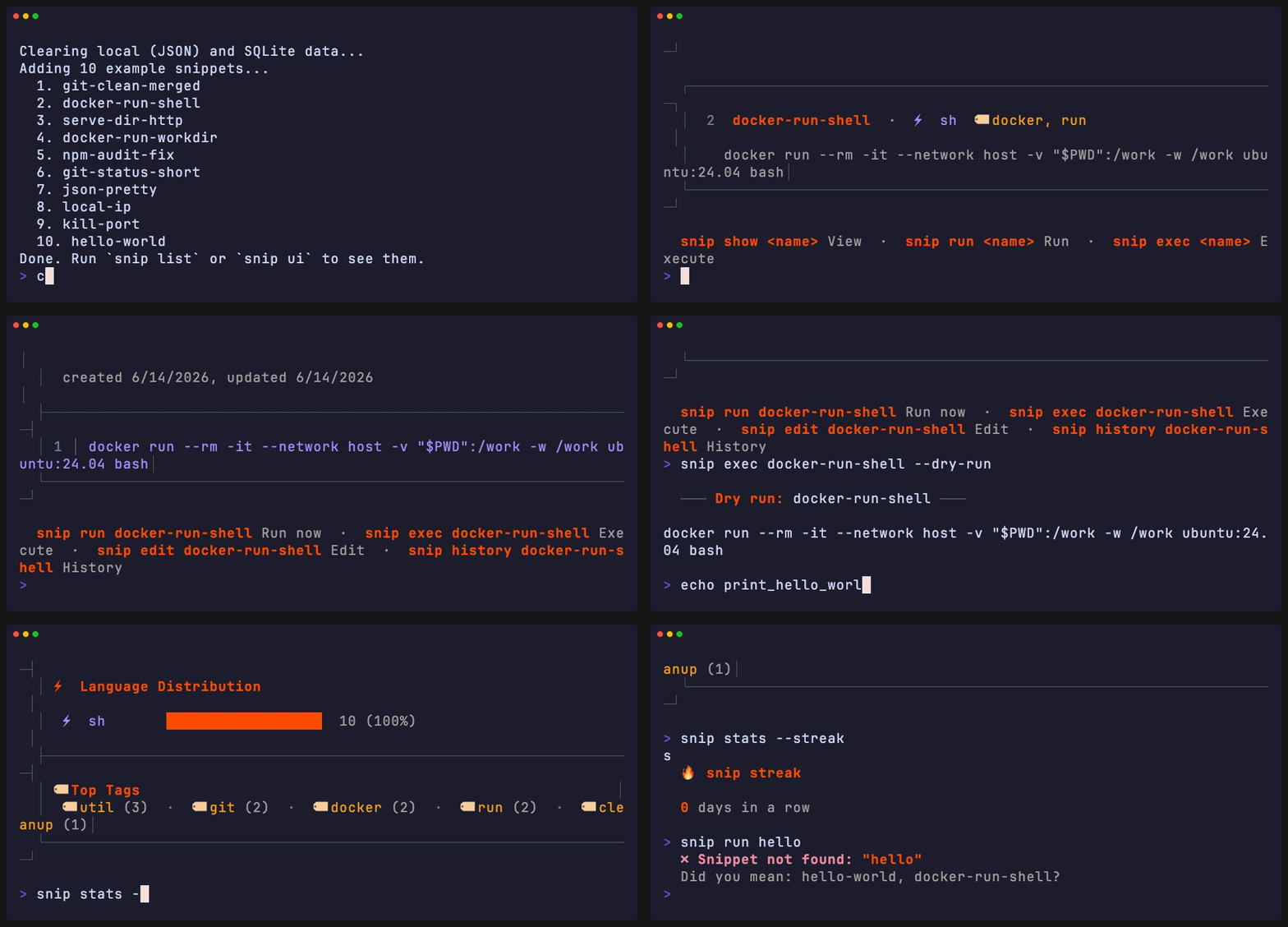
# Save a snippet
echo 'docker compose up -d --build' | snip add dc-up --lang sh --tags docker

# Find it
snip search docker

# Run it
snip exec dc-up

# Launch the TUI
snip ui
First time? snip init runs a guided setup (editor, Ctrl+G shell widget, example snippets).
Prerequisites: Node.js ≥ 18
npm install -g snip-manager    # or: yarn global add / pnpm add -g

snip --version
snip doctor # validates storage, editor, fzf, shell, gist| Command | Description |
|---|---|
snip add <name> |
Save a snippet from stdin or $EDITOR (snip add:js etc. for language shortcuts) |
snip list |
List all snippets (--json, --tag, --lang, --sort, --limit) |
snip search <query> |
Fuzzy search (--json, --limit) |
snip show <name> |
Display snippet (--json, --raw, --edit) |
snip run <name> |
Preview + confirm + execute (with template prompts) |
snip exec <name> |
Execute immediately (--dry-run, --force) |
snip pipe <name> |
Pipeline mode — stdin→template→stdout (--json, --dry-run) |
snip edit <name> |
Open in $EDITOR |
snip rm <name> |
Delete (--force to skip confirm) |
snip update <name> |
Update metadata (--tags, --lang) |
snip last / snip recent [n] |
Re-run last / show recently used |
| Command | Description |
|---|---|
snip mcp |
Start the MCP server (stdio) |
snip mcp install <client> |
Configure snip for claude / cursor / goose / continue |
snip team init |
Create .snip/ team library in the repo |
snip team push / sync / status |
Share, import, and compare team snippets |
| Command | Description |
|---|---|
snip cp / snip mv / snip cat |
Duplicate / rename / print raw |
snip stats |
Library statistics (--json, --streak) |
snip import-history |
Turn repeated shell-history commands into snippets |
snip grab <url> |
Import from URL or github:user/repo/path |
snip fzf |
fzf search with live preview |
snip alias [shell] |
Every snippet becomes a shell command (eval "$(snip alias)") |
snip widget [shell] |
Ctrl+G hotkey widget for zsh/bash/fish |
snip completion [shell] |
Tab-completion (bash, zsh, fish) |
snip sync push/pull |
GitHub Gist sync |
snip share / unshare / discover |
Publish & find community snippets via Gists |
snip export / snip import |
JSON backup / restore |
snip doctor / snip config / snip init / snip ui |
Health check, config, setup wizard, TUI |
snip ui — split-pane fuzzy-search interface (Catppuccin Mocha). j/k navigate, / search, Enter preview, c copy, r run, e edit, a add, d delete (with 5s undo), t tag filter, s sort, q quit. First launch shows keybinding hints.
Use {{variable}} or {{variable:default}} — auto-detected at runtime, prompted interactively (or resolved from JSON in pipeline mode):
echo 'docker run --rm -it {{image:ubuntu:24.04}} {{cmd:bash}}' \
  | snip add docker-dev --lang sh --tags docker

snip run docker-dev
#   image [ubuntu:24.04]: node:20
# cmd [bash]: ↵snip pipe deploy-api | tee /tmp/deploy.log # pipe output
echo '{"host":"prod.api.com"}' | snip pipe deploy --json # JSON template values
curl -s https://api.example.com/data | snip pipe parse-json # stdin passthroughAlso pipe-friendly: snip cat, snip show --raw, snip list --json, snip search --json.
eval "$(snip alias)"          # every snippet becomes a command
eval "$(snip widget zsh)"     # Ctrl+G → search → paste inline
snip import-history --last 500 # mine your shell history for repeated commandssnip sync push # push your library to a Gist
snip sync pull <gist-id> # pull
snip share deploy-api # publish one snippet publicly
snip discover docker # search community-shared snippetsRequires a GitHub token with gist scope in SNIP_GIST_TOKEN.
snip config set editor "code --wait"
snip config set useSqlite true       # for 100+ snippets
snip config list| Option | Default | Description |
|---|---|---|
editor |
$EDITOR / vi |
Snippet editor |
useSqlite |
false |
SQLite instead of JSON |
snippetDir |
~/.snip |
Data directory |
SQLite uses better-sqlite3 (native) or falls back to sql.js (WASM). snip doctor diagnoses storage issues.
Optional: AI snippet generation
snip ai generate "<prompt>" generates snippets via the OpenAI API (--lang, --tags, --name, --model).
export SNIP_AI_API_KEY="sk-..."
snip ai generate "curl wrapper with retry" --name curl-retry
Config keys: ai_provider, ai_model (default gpt-3.5-turbo), ai_max_tokens, ai_api_key.
snip
├── bin/snip              # Entry point
├── lib/
│   ├── cli.js            # Command definitions (Commander.js)
│   ├── mcp-server.js     # MCP server — 16 tools + resources
│   ├── storage.js        # JSON + SQLite abstraction
│   ├── search.js         # Fuse.js fuzzy search
│   ├── exec.js           # Multi-language runner
│   ├── template.js       # {{var:default}} engine
│   ├── safety.js         # Dangerous command detection
│   ├── team.js           # Repo-local .snip/ team library
│   ├── sync/             # Gist sync module
│   └── commands/         # One file per command
├── completions/          # Shell completions (bash, zsh, fish)
├── __tests__/            # Jest test suite
└── docs/                 # Website + demo + pivot plan
Design decisions:
- No daemon — every invocation is stateless; sub-150ms cold starts (heavy modules lazy-load).
- Dual storage — JSON for instant start, SQLite for scale; same API.
- Git as team backend —
.snip/lives in your repo; no server, no accounts. - Blessed for TUI — raw terminal control, no React/Ink overhead.
git clone https://github.com/Bharath-code/snip.git
cd snip && npm install

node bin/snip --help     # run locally
node bin/snip seed       # example snippets
npm test                 # Jest suite
npm run lint             # ESLint
Adding a command = one file in lib/commands/ + registration in lib/cli.js. See CONTRIBUTING.md.
"command not found: snip"
Ensure npm's global bin is in your PATH:
export PATH="$(npm prefix -g)/bin:$PATH"Agent can't see snip tools
- Verify the server starts:
snip mcp(should wait silently on stdio; Ctrl+C to exit). - Re-run
snip mcp install <client>and restart the client. - Check the client's MCP logs — the server name is
snip.
Editor not opening
snip config set editor "vim" # or code, nvim, nano, sublGitHub token errors with Gist sync
export SNIP_GIST_TOKEN=your_token_hereGenerate a token at https://github.com/settings/tokens with gist scope.
SQLite mode errors
npm install -g better-sqlite3    # native module
# or stay on the JSON backend (default)
snip config set useSqlite falseThe current direction — policy files, audit logging, and approval flows for agent execution — is laid out in docs/pivot-plan.md. Release history in CHANGELOG.md.
Why not just let the agent run commands directly?
Agents already can — that's the problem. snip narrows what they run to a library you curated, makes execution dry-run by default, and hard-blocks destructive patterns. It's the difference between "the agent can run anything" and "the agent runs what your team verified."
Is my data secure?
Snippets are stored locally in ~/.snip/ (or your repo's .snip/). Nothing leaves your machine unless you explicitly snip sync push or snip share.
Does snip support custom languages?
Yes. Use --lang — snip resolves the interpreter (node, python3, ruby, etc.) automatically, falling back to your shell.
- Issues — bug reports & feature requests
- Discussions — questions & ideas
- Security Policy — vulnerability reporting