At JoliCode we use Slack to communicate. And to bring fun to our daily life, we created a #monologue channel where we can share our thoughts, our feelings, our dreams, our fears, our jokes, our memes, our pictures, our videos, our music, our links, our code, our life. But we have a special rule in this channel.
Only one person can use this channel per day. The others cannot: no message, no reaction, no changing the topic, no message deleting, no poll. The pledge is to offer breakfast 🍪🍩🥐.
This bot is here to help us to respect this rule. It will post a message in the channel as soon as someone breaks the rule!
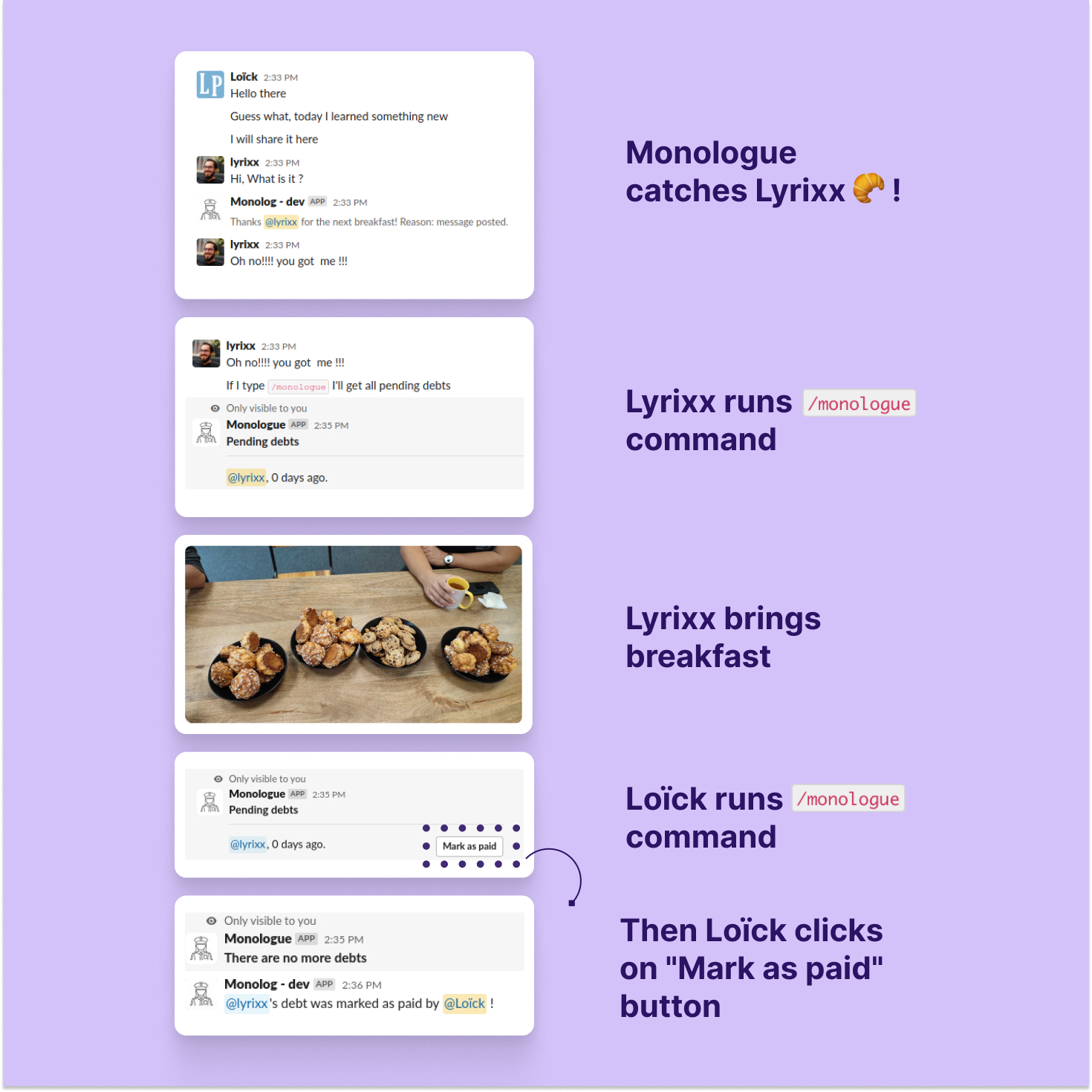
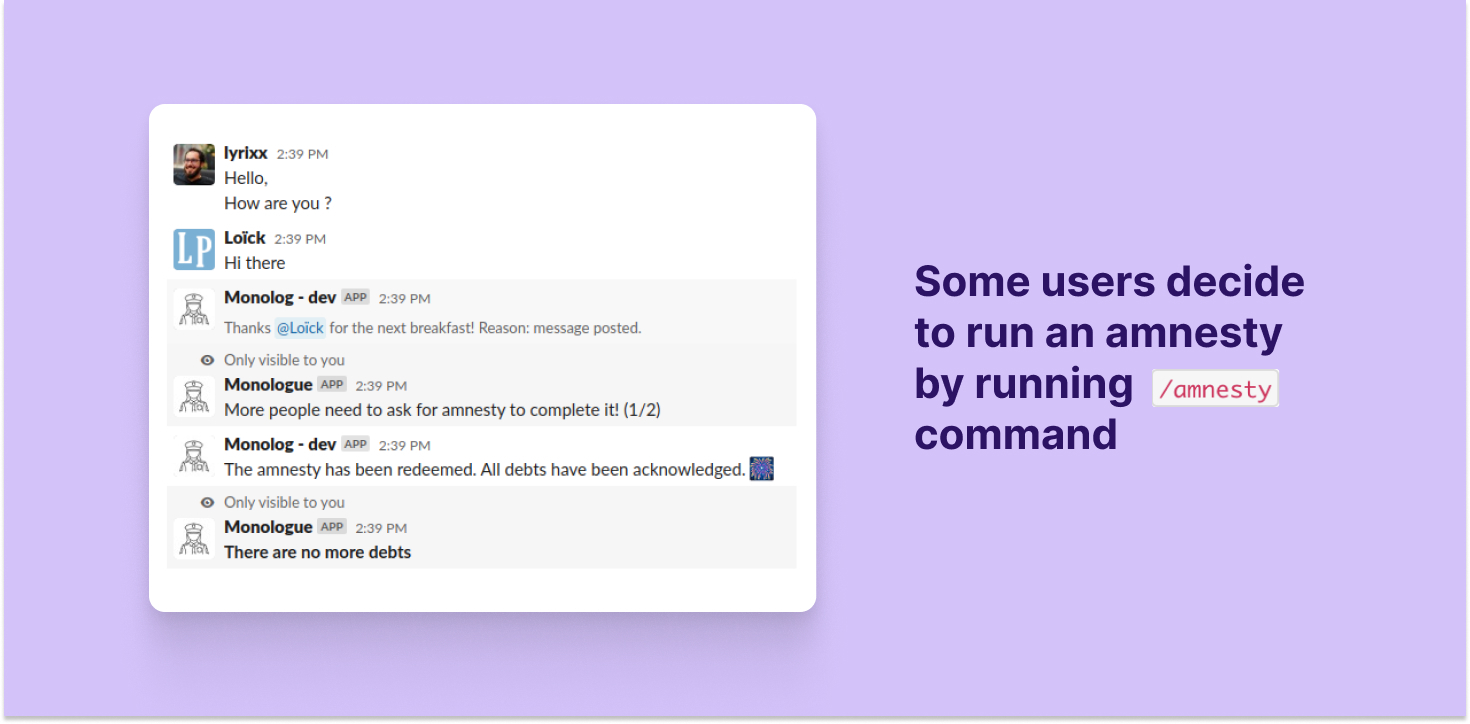
If you want to get more information, you can read the announce of the release.
We provide a app manifest to help you to create the Slack application. You can
load the file in doc/slack.yaml when adding a new application in your
workspace. Don't forget to replace all callback URLs!
Otherwise, you can follow the steps below:
- In "Basic Infirmation"
- Copy the
Signin secretto the.env.localfile,SLACK_SIGNING_SECRETkey
- Copy the
- Set permission on bot (in "OAuth & Permissions")
commandschannels:historychat:write
- Invite the bot/apps in your channel
- In "Interactivity & Shortcuts"
- Enable interactivity
- Add this URL:
https://example.com/action
- Slack command
- Command:
/monologue(or whatever you like)- Request URL:
https://example.com/command/list - Short Description:
List all debts
- Request URL:
- Command:
/amnesty(or whatever you like)- Request URL:
https://example.com/command/amnesty - Short Description:
Ask for a general amnesty
- Request URL:
- Command:
- Event Subscription
- Enable events
- URL:
https://example.com/message - Events:
message.channelsreaction_added
- In "Install App":
- install the application
- Copy the
Bot User OAuth Tokento the.env.localfile,SLACK_TOKENkey
- From somewhere (this information is always hard to find)
- Copy the channel ID (where you'll invite the bot) to the
.env.localfile,SLACK_CHANNELkey
- Copy the channel ID (where you'll invite the bot) to the
This project uses castor to manage common tasks. It's not mandatory but it's easier with it.
# configure remaining parameters in .env.local
castor start
castor qa:all
The application ships as two self-contained Docker images, built from the
"production stages" of infrastructure/docker/services/php/Dockerfile:
php: php-fpm listening on the unix socket/var/run/php/php-fpm.sock, with the code and the vendors baked in,APP_ENV=prod. It is also the CLI image: the database migrations run with it;nginx: the official nginx image, thepublic/directory and the site configuration, forwarding PHP requests to that socket.
Both use the php-fpm and nginx configuration of the dev container
(services/php/php/ and services/php/nginx/); what production does
differently is in services/php/php/mods-available/app-prod.ini. Everything
else (secrets, database, Slack credentials, dashboard password) is provided
through environment variables at runtime.
On every push to main (and on every git tag), the "Build and push production
images" workflow pushes both images to ghcr.io/<repository>/php and
ghcr.io/<repository>/nginx, tagged with the short commit sha, latest on
main, and the tag name when there is one.
The prod castor context runs the usual tasks on a dedicated compose stack
(docker-compose.prod.yml: postgres + the two images, no bind mount, no
router), independent from the development one:
castor build -c prod       # builds the php and nginx images
castor start -c prod       # starts the stack and runs the migrations
# -> http://127.0.0.1:8080 (HTTP_PORT=18080 castor start -c prod to change the port)
castor destroy -c prod     # removes the containers and the volumes
It uses dummy secrets: to test with a real Slack workspace, put the
corresponding variables (SLACK_TOKEN, SLACK_SIGNING_SECRET,
SLACK_CHANNEL, DASHBOARD_PASSWORD...) in a .env.prod.local file at the
root of the repository (ignored by git, loaded by the php container).
To push images from your machine instead of waiting for the CI (you need to be
logged in to the registry with docker login ghcr.io, and a buildx builder
able to export a registry cache, e.g. docker buildx create --use):
REGISTRY=ghcr.io/<org>/<repo> castor docker:push -c prod --tag=my-test
In slack you have two commands
/monologueto list all the pending debts, grouped by user, with buttons to mark the oldest one or all of them as paid;/amnestyto ask for a general amnesty.
Thanks JoliCode for sponsoring this project.