












Most free proxy lists are 95 % dead, and a good part of the rest are honeypots or proxies that inject scripts into your pages. proxy-scraper collects public HTTP, SOCKS4 and SOCKS5 proxies from 700+ sources and keeps only the ones that pass every check. It learns with every run which sources are worth it, and it can turn the result into a single rotating proxy.


Table of contents
With pipx (recommended – gives you a proxy-scraper command in its own environment):
pipx install proxy-scraper-cli
proxy-scraper
The package is called proxy-scraper-cli on PyPI (the plain name is taken), the command is proxy-scraper.
Other ways: Docker, pip, a faster event loop, or straight from the repo
# Docker – learned state and results stay in two folders next to you
mkdir -p proxy-data results
docker run --rm --user "$(id -u):$(id -g)" -v "$PWD/proxy-data:/data" -v "$PWD/results:/work/results" \
  ghcr.io/maximilianfeix/proxy-scraper --want 50 --https-only

# pip into the current environment
pip install proxy-scraper-cli

# optional: faster event loop on macOS/Linux
pipx install "proxy-scraper-cli[fast]"

# the latest main instead of the latest release
pipx install git+https://github.com/maximilianfeix/proxy-scraper.git

# no install at all
git clone https://github.com/maximilianfeix/proxy-scraper.git
cd proxy-scraper
pip install -r requirements.txt
python3 proxy_scraper.py
Every release also ships a wheel you can install with pip install <file>.whl, and a multi-arch image (amd64/arm64) on ghcr.io. In the container the wizard never shows up, it runs straight away. For the proxy server use --serve --serve-host 0.0.0.0 with -p 127.0.0.1:8899:8899, so the port is only open on your own machine.
Tab completion for bash, zsh, fish and PowerShell:
eval "$(proxy-scraper --completion zsh)"     # in ~/.zshrc (after compinit), same for bash in ~/.bashrc
proxy-scraper --completion fish > ~/.config/fish/completions/proxy-scraper.fish
proxy-scraper --completion powershell | Out-String | Invoke-Expression   # in $PROFILE
Installed, the learned state lives in your user data folder (~/Library/Application Support/proxy-scraper, %LOCALAPPDATA%\proxy-scraper or ~/.local/share/proxy-scraper; override with PROXY_SCRAPER_HOME) and results go to ./results. Run from a clone, both stay inside the project.
Started without arguments, a wizard asks what you are looking for:

| Preset | What it does |
|---|---|
| Find everything | all protocols, maximum yield |
| Browsing & web | HTTP + SOCKS5, HTTPS-capable, at least anonymous, under 3 s |
| Maximum anonymity | elite SOCKS5 with HTTPS only |
| Fast & stable | proxies under 1 s only |
| A few right now | stops after 25 hits |
| Recheck the last hits | no collecting, takes seconds |
| Proxy server right away | recheck the last hits, then serve them on :8899 |
| Same as last time | your previous choice |
| Custom … | protocols, countries, anonymity, HTTPS, target site, latency, amount, check mode |
Keys: ↑↓ select · Space toggle · 1–9 jump · Enter next · Esc back · q quit. In scripts and cron jobs the wizard never shows up – pass options or -y.
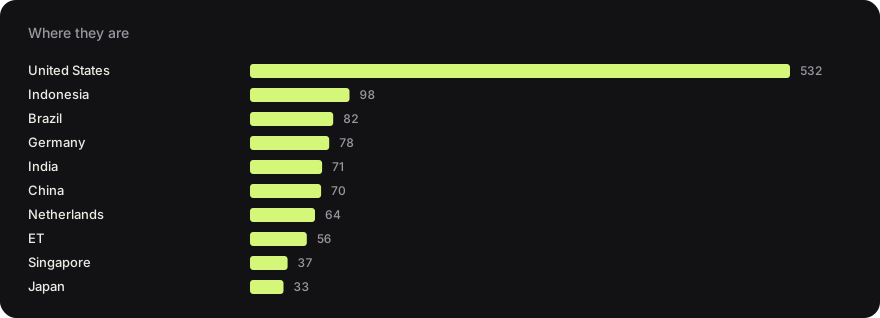
Don't want to scan yourself? Every hour GitHub Actions runs the tool and publishes the hits to the proxy-list branch – every entry worked in the last run, fastest first.
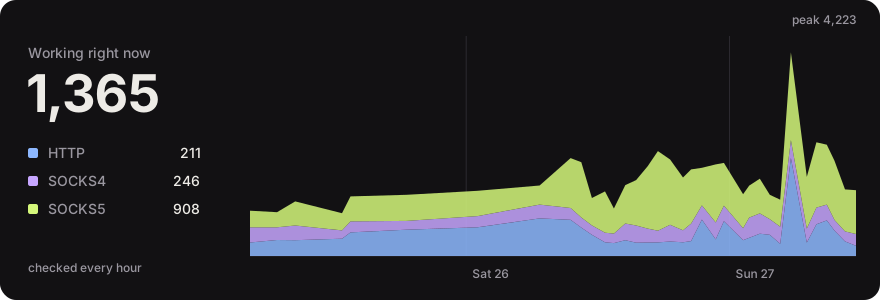
→ Browse it on the website – search, filter by type, country, HTTPS, provider and latency, see how long each proxy has been up and how often it was on the list this week, copy or download exactly the proxies you need.
Every protocol and country also has its own page with a plain download, e.g. SOCKS5 or Germany (country/de/proxies.txt).






| List | Format | Link |
|---|---|---|
| All | socks5://1.2.3.4:1080 |
all.txt |
| HTTP · SOCKS4 · SOCKS5 | 1.2.3.4:8080 |
http.txt · socks4.txt · socks5.txt |
| HTTPS-capable only | type://ip:port |
https.txt |
| Elite only | type://ip:port |
elite.txt |
| Gets through to Google · Reddit · Amazon · Instagram · TikTok (no captcha, no block in the last run) | type://ip:port |
google.txt · reddit.txt · amazon.txt · instagram.txt · tiktok.txt |
| Stable, on the list in 90 %+ of this week's runs | type://ip:port |
stable.txt |
| With all details | latency, country, HTTPS, anonymity, exit IP, uptime, sites | proxies.json · proxies.csv |
curl -s https://raw.githubusercontent.com/maximilianfeix/proxy-scraper/proxy-list/socks5.txt | headOver time: every day the first run's proxies.json is kept for good as a gzipped asset of the release of that year, like snapshots-2026 – proxies-2026-09-28.json.gz and so on, for anyone who wants to look at free proxies over weeks and months.
Every file is also on GitHub Pages, which sits behind a CDN, isn't rate limited like raw.githubusercontent and sends CORS headers, so it works straight from the browser: https://maximilianfeix.github.io/proxy-scraper/socks5.txt. jsDelivr works too, but can lag behind by a few hours.
Or let the tool start from it: proxy-scraper --recheck live downloads the list and checks it again from your network – about 30 seconds instead of a full scan (517 of 1,169 worked from here). With --serve you have a rotating proxy in under a minute.
proxy-scraper-mcp is an MCP server: Claude Code, Claude Desktop, Cursor, VS Code, Codex and any other MCP client can ask for working proxies and load pages through them.
| Tool | What it does |
|---|---|
get_proxies |
working proxies right now, from the hourly list – filter by protocol, country, HTTPS, elite, no datacenter, not blocklisted, stable, uptime, latency, gets through to Google/Reddit/Amazon |
check_proxies |
checks proxies from your own network, so they work from where your code runs (30–90 s, reports progress) |
fetch_url |
loads a page through a verified proxy, switches proxies by itself when one fails, returns readable text – HTTPS only through proxies with verified TLS |
Things to ask your agent: "Load bbc.com/news as seen from the UK", "Give me 5 SOCKS5 proxies from Germany that aren't in a datacenter", "Check which of these sites block free proxies".
Needs uv – it fetches a suitable Python by itself if yours is older than 3.10. Claude Code:
claude mcp add proxy-scraper -- uvx --python ">=3.10" --from "proxy-scraper-cli[mcp]" proxy-scraper-mcpClaude Desktop, Cursor and most other clients – add this to the MCP config (Claude Desktop: Settings → Developer → Edit Config, Cursor: ~/.cursor/mcp.json):
{
  "mcpServers": {
    "proxy-scraper": {
      "command": "uvx",
      "args": ["--python", ">=3.10", "--from", "proxy-scraper-cli[mcp]", "proxy-scraper-mcp"]
    }
  }
}
VS Code, Codex, or without uv
VS Code – .vscode/mcp.json:
{
  "servers": {
    "proxy-scraper": {
      "type": "stdio",
      "command": "uvx",
      "args": ["--python", ">=3.10", "--from", "proxy-scraper-cli[mcp]", "proxy-scraper-mcp"]
    }
  }
}
Codex – ~/.codex/config.toml:
[mcp_servers.proxy-scraper]
command = "uvx"
args = ["--python", ">=3.10", "--from", "proxy-scraper-cli[mcp]", "proxy-scraper-mcp"]
Without uv: pipx install --python python3.12 "proxy-scraper-cli[mcp]" (any Python 3.10+), then use proxy-scraper-mcp as the command.
It's also in the official MCP registry as io.github.maximilianfeix/proxy-scraper, so clients that browse the registry can install it from there.
The server tells agents what it tells you: free proxies are run by strangers, so no logins, cookies or personal data through them. Local and private addresses are refused, and results go to proxy-scraper's data folder, not into the project you're working in.
|
Setup wizard |
Fast |
|
Real verification |
Learns with every run |
|
Finds new sources by itself |
Filters & target sites |
|
Live dashboard |
Rotating proxy server |
|
Runs everywhere |
Thoroughly tested |
| Typical proxy list repo | proxy-scraper | |
|---|---|---|
| Proxies checked right before you use them | ❌ | ✅ |
| Honeypots that fake a successful check filtered out | ❌ | ✅ |
| Proxies that inject scripts or ads filtered out | ❌ | ✅ |
| HTTPS tested with verified TLS | rarely | ✅ |
| Anonymity level and country per proxy | sometimes | ✅ |
| Only proxies that reach your target site | ❌ | ✅ --target |
| Learns which sources are worth it | ❌ | ✅ |
| Usable as a single rotating proxy | ❌ | ✅ --serve |
| API to fetch a proxy (proxy_pool compatible) | ❌ | ✅ /get |
| Ready-made list without running anything | ✅ | ✅ live list |
# 50 proxies that can do HTTPS – then stop
proxy-scraper --want 50 --https-only

# only Germany, Austria and Switzerland, the 20,000 most promising candidates
proxy-scraper --country DE,AT,CH -l 20000

# fast elite SOCKS5 proxies
proxy-scraper --types socks5 --anonymity elite --max-latency 1500

# 20 proxies that really reach Google AND Discord
proxy-scraper --target google.com --target discord.com --want 20

# only recheck the last hits (plus history) – takes seconds
proxy-scraper --recheck

# wizard with defaults – it keeps what you already passed
proxy-scraper -i --country DE

# which sources deliver the most?
proxy-scraper --list-sources
Running from a clone? Replace proxy-scraper with python3 proxy_scraper.py.
from proxyscraper import check_proxies, find_proxies

if __name__ == "__main__":  # needed on macOS/Windows, the parser uses a process pool
    for p in find_proxies(want=20, https=True, countries=["DE", "NL"], no_datacenter=True):
        print(p.url, p.latency, p.country, p.org)

    alive = check_proxies(["socks5://1.2.3.4:1080", "5.6.7.8:3128"])  # your own list
Same run as the command line – sources, learning, every check, result files – just without terminal output. Each result has url, latency, exit_ip, https, anonymity, country, asn, org and hosting. There's an async version of both (find_proxies_async, check_proxies_async).
Don't need a fresh scan? live_proxies takes the live list instead – no checks, one download, done in about a second:
import itertools, requests
from proxyscraper import live_proxies

proxies = live_proxies(types=["socks5"], https=True, min_uptime=90)  # the reliable ones this week
pool = itertools.cycle(p.url for p in proxies)
r = requests.get("https://api.ipify.org", proxies={"https": next(pool)}, timeout=15)  # pip install "requests[socks]"
Same filters as find_proxies, plus min_uptime, works_on (["google"], "reddit", "amazon", "instagram", "tiktok") and limit. Every result also has uptime_24h, uptime_7d, first_seen, up_for_hours and sites.
Or let the library do the retrying: ProxyRotator loads a URL through the list and moves on to the next proxy when one fails – HTTPS only through proxies with verified TLS.
from proxyscraper import ProxyRotator

with ProxyRotator(country="DE") as rotator:
    r = rotator.get("https://httpbin.org/ip")
    print(r.status, r.text, "via", r.via)
Usually a few seconds; when many proxies in a row are down it can take a minute (timeout= is per attempt). There's aget() with async with for asyncio code.
Already using requests, httpx, Playwright or Scrapy? proxy_url() gives you one local proxy address that rotates behind the scenes – every connection goes out through another proxy from the list, best first, dead ones skipped:
import requests
from proxyscraper import ProxyRotator

with ProxyRotator(country="DE") as rotator:
    proxy = rotator.proxy_url()          # http://country-de:…@127.0.0.1:…
    requests.get("https://api.ipify.org", proxies={"http": proxy, "https": proxy})
    # httpx.Client(proxy=proxy) · scrapy: meta={"proxy": proxy} · curl -x "$proxy"
    # Playwright wants the login apart: chromium.launch(proxy=rotator.playwright_proxy())
It runs on 127.0.0.1 with a random password, takes over each new hourly list by itself and stops with the with block.
A list is nice – but usually you just want to enter one proxy that always works:
proxy-scraper --recheck --serve # recheck the last hits, then go – takes secondscurl -x http://127.0.0.1:8899 https://api.ipify.org # a different IP every time
curl -x socks5h://127.0.0.1:8899 https://api.ipify.org # SOCKS5 on the same port
curl -x http://country-de:x@127.0.0.1:8899 https://api.ipify.org # only German exits
curl -x http://session-cart42:x@127.0.0.1:8899 https://shop.example # same proxy for this session
curl http://127.0.0.1:8899/__proxy-scraper/status # pool and counters as JSON
curl http://127.0.0.1:8899/__proxy-scraper/metrics # the same for Prometheus/GrafanaLike commercial rotating proxies, the username carries what you want: country-XX, type-http|socks4|socks5 and session-NAME, combinable (country-us-type-socks5-session-a). It works for HTTP (Proxy-Authorization) and SOCKS5 (username/password auth). By default the password is ignored and the server only listens on 127.0.0.1.
To reach it from other machines, give it a password – every client then has to send it, over HTTP and SOCKS5 alike, and the status page wants it as Basic auth:
export PROXY_SCRAPER_SERVE_PASSWORD=$(openssl rand -hex 16)   # the env var keeps it out of `ps`
proxy-scraper --recheck --serve --serve-host 0.0.0.0
curl -x "http://country-de:$PROXY_SCRAPER_SERVE_PASSWORD@your-server:8899" https://api.ipify.org
Without a password, --serve-host means anyone who reaches the port can use it. The ready-made compose.yaml starts the server in Docker from the live list, with a password, a health check and learned state in a volume: put PROXY_PASSWORD=… into .env, then docker compose up -d.
| Option | What it does |
|---|---|
--rotate weighted |
default: fast and proven proxies more often, everyone gets a chance |
--rotate random / round-robin |
evenly, at random or in turn |
--rotate fastest |
always the fastest one that isn't busy |
--sticky 300 |
the same site keeps its proxy for 5 minutes (logins, carts) |
- every connection goes through a different proxy (unless sticky); fast and proven ones are preferred
CONNECTfor HTTPS and plain HTTP requests; HTTP, SOCKS4 and SOCKS5 proxies can sit behind it (SOCKS5 with DNS through the proxy)- HTTPS only uses proxies that passed the test with verified TLS – no broken encryption
- if a proxy stays silent inside the tunnel or returns an error page instead of TLS, the same first packet quietly goes to the next one
- three failures in a row and a proxy leaves the rotation – every 5 minutes those get re-checked and come back if they work again
--serve-refill 6checks fresh proxies every 6 hours in the background (the live list with--recheck live, otherwise the last run + history) with the same checks and filters, and adds the hits – a server that runs for days doesn't run dry- listens on
127.0.0.1only (unless--serve-hostsays otherwise), optionally with a password; live view with requests, success rate, pool and the latest connections
In testing: 20 of 20 HTTPS requests succeeded, over 15 different exit IPs. In the wizard this is Proxy server right away.
Some programs want a proxy address, not a proxy – to hand it to a browser, a worker or a queue. The same port answers plain HTTP requests with one:
curl http://127.0.0.1:8899/get                          # one proxy as JSON, chosen like a connection would be
curl "http://127.0.0.1:8899/get?country=DE&https=1&format=txt"   # → http://203.0.113.7:8080
curl "http://127.0.0.1:8899/all?protocol=socks5&limit=20"        # the 20 best SOCKS5 proxies
curl "http://127.0.0.1:8899/report?proxy=203.0.113.7:8080&ok=0" # it failed you – three times and it's out| Endpoint | What it does |
|---|---|
/get |
one proxy, picked by the --rotate strategy |
/pop |
like /get, and the proxy leaves the pool |
/all |
every usable proxy, best first (limit=N) |
/count |
totals by type and country |
/delete?proxy=IP:PORT |
take a proxy out |
/report?proxy=IP:PORT&ok=0 |
feedback from your own requests |
Filters work on /get, /pop and /all: country=DE,AT, protocol=socks5, https=1, anonymity=elite, max_latency=1500, and format=txt for plain URLs. With --serve-password the API wants it as Basic auth, like the status page.
Coming from jhao104/proxy_pool? The endpoints, type=https and the JSON fields (proxy, https, region, anonymous, check_count, fail_count, …) are the same, so point your code at port 8899 and it keeps working – without Redis, and with proxies that passed the honeypot, tampering and TLS checks:
import requests
proxy = requests.get("http://127.0.0.1:8899/get?type=https").json()["url"]   # e.g. socks5://…, type included
requests.get("https://example.com", proxies={"http": proxy, "https": proxy})The live list can also come to you: bot/ is a Discord bot that posts every run into a server – a summary with the fastest proxies, the full lists per protocol as files, and slash commands like /proxies type:socks5 country:DE https:true. It sets up its own read-only channels when you invite it, and a GitHub Action deploys it to a server as a systemd service. The same process answers on Telegram too: /proxy de socks5 for one proxy with a curl line, /proxies 10 us https for a short list. Setup in bot/README.md.
flowchart LR
    A[sources.json<br/>meta lists<br/>GitHub discovery] --> B[Fetch & parse<br/>in parallel on all cores]
    B --> C[Prioritize<br/>history → good sources → rest]
    C --> D[Check<br/>HTTP · SOCKS4 · SOCKS5]
    D --> E[Details<br/>HTTPS · anonymity · country]
    E --> F[results/]
    D -. hit rate per source .-> G[(learned state)]
    G -. next run .-> C
- Sources – the curated list in
sources.json, meta sources (other projects that maintain lists of proxy sources) and, once a day, a GitHub search for actively maintained repos. Every search adds to what earlier ones found; a list the search hasn't seen for three weeks drops out. - Collect – plain text, HTML tables, JSON APIs and
type://ip:portlines are recognized; private and reserved address ranges are dropped. Lists that haven't changed since the last run answer304and come from a local cache – a second run right after the first loads 0 MB instead of ~160 MB. - Prioritize – known working proxies first, then by the learned hit rate of their sources.
- Check – every proxy has to fetch its exit IP from a check target (
checkip.amazonaws.com, withifconfig.me,ipinfo.io,wtfismyip.comandident.meas reserves – none of them behind Cloudflare) and return a valid, foreign IP. If the target goes down mid-run, the tool switches and re-checks the proxies that were affected, so the statistics don't learn from an outage. Anyone passing your own IP through is out. Then comes the confirmation viahttpbin.org: fake proxies that only answer the first check with “200 + IP” fail here. Finally a static HTML page has to arrive byte for byte as it does without a proxy – anyone injecting ads or scripts is out. - Countries and providers – looked up offline in the free DB-IP databases, including the provider (ASN) and whether it's probably a datacenter (about 45 % of working proxies are) (downloaded once a month, ~2 µs per lookup); ip-api.com is only asked for the few addresses it doesn't know.
- Blocklists – one DNS lookup per exit IP against SpamCop, cached for the run: about 29 % of working proxies exit from a listed IP, and sites that use the list show those captchas or block them.
--no-blocklisteddrops them. If your DNS resolver is refused by SpamCop (large public resolvers are), the lookup is skipped instead of guessing. - Learn – hit rates and history are stored. Sources without hits, with content unchanged for a week or permanently unreachable are skipped.
📸 See the live dashboard and final report


proxy-scraper --source https://example.com/my-list.txt --source socks5=./socks.txt   # on top of the 700+ sources
proxy-scraper --only-sources --source bought.txt --want 50                            # only yours
Any text with ip:port works; lines like socks5://user:pass@host:port keep their type, bare ones are tried as HTTP and SOCKS5 unless you write http=….
Every run gets its own folder; results/latest.txt always names the newest one (on macOS/Linux there is also the symlink results/latest):
results/2026-09-24_18-42-07/
├── all.txt        socks5://203.0.113.10:1080   (fastest first)
├── http.txt       203.0.113.20:8080            (plain ip:port lists per type)
├── socks4.txt
├── socks5.txt
├── proxies.json   latency, country, HTTPS, anonymity, exit IP
└── proxies.csv
Use the fastest proxy from the last run – free proxies die quickly, so --recheck first if the run is older than a few minutes
proxy-scraper --recheck -y
curl -x "$(head -1 results/latest/all.txt)" http://api.ipify.org
For HTTPS, pick a proxy with "https": true from proxies.json – like the Python example below does.
Python requests (pip install "requests[socks]" for SOCKS)
import json
from pathlib import Path

import requests

run = Path("results") / Path("results/latest.txt").read_text().strip()   # works on every OS
proxies = json.loads((run / "proxies.json").read_text())   # fastest first

for p in proxies:
    if not p["https"]:
        continue
    try:
        r = requests.get("https://api.ipify.org", proxies={"http": p["url"], "https": p["url"]}, timeout=8)
        print(p["url"], "→", r.text)
        break
    except requests.RequestException:
        continue  # free proxies come and go – just take the next one
httpx (pip install "httpx[socks]") – straight from the hourly list, no scan
import httpx
from proxyscraper import live_proxies

for p in live_proxies(types=["http", "socks5"], https=True, min_uptime=90, limit=10):  # httpx can't do SOCKS4
    try:
        with httpx.Client(proxy=p.url, timeout=10) as client:
            print(p.url, "→", client.get("https://api.ipify.org").text)
        break
    except httpx.HTTPError:
        continue  # next one
aiohttp (pip install aiohttp aiohttp-socks – aiohttp alone can't do SOCKS)
import asyncio

import aiohttp
from aiohttp_socks import ProxyConnector, ProxyError
from proxyscraper import live_proxies_async


async def main():
    for p in await live_proxies_async(https=True, min_uptime=90, limit=10):
        try:
            async with aiohttp.ClientSession(connector=ProxyConnector.from_url(p.url)) as session:
                async with session.get("https://api.ipify.org", timeout=aiohttp.ClientTimeout(total=10)) as r:
                    print(p.url, "→", await r.text())
                    return
        except (aiohttp.ClientError, ProxyError, asyncio.TimeoutError, OSError):
            continue  # free proxies come and go – just take the next one

asyncio.run(main())
Scrapy – a downloader middleware that sends every request, retries included, through the next proxy. Scrapy only speaks HTTP proxies, https=True picks the ones that can tunnel https:// pages
import itertools

import scrapy
from scrapy.crawler import CrawlerProcess
from proxyscraper import live_proxies

PROXIES = [p.url for p in live_proxies(types="http", https=True, min_uptime=50)]
if not PROXIES:
    raise SystemExit("No proxy matches right now – loosen the filters (e.g. min_uptime)")
POOL = itertools.cycle(PROXIES)


class RotatingProxy:
    def process_request(self, request, spider=None):  # newer Scrapy leaves out spider
        request.meta["proxy"] = next(POOL)


class IpSpider(scrapy.Spider):
    name = "ip"
    start_urls = [f"https://api.ipify.org/?n={i}" for i in range(3)]
    custom_settings = {
        "DOWNLOADER_MIDDLEWARES": {f"{__name__}.RotatingProxy": 350},
        "RETRY_TIMES": 5, "DOWNLOAD_TIMEOUT": 15,
    }

    def parse(self, response):
        print(response.meta["proxy"], "→", response.text)


if __name__ == "__main__":
    process = CrawlerProcess()
    process.crawl(IpSpider)
    process.start()
In a Scrapy project, put RotatingProxy in middlewares.py and add it to DOWNLOADER_MIDDLEWARES in settings.py. For long crawls, reload the pool now and then – the list changes every hour.
proxychains, Clash / Mihomo, sing-box – ready-made configs with --export
proxy-scraper --want 30 -y --export proxychains,clash,singbox
proxychains4 -f results/latest/proxychains.conf curl https://api.ipify.org
clash.yaml has all HTTP and SOCKS5 proxies plus a url-test group that always picks the fastest. singbox.json does the same for sing-box, SOCKS4 included, and opens a local proxy: sing-box run -c results/latest/singbox.json, then use 127.0.0.1:2080 as HTTP or SOCKS5 proxy. All three leave out HTTP proxies that can't tunnel (CONNECT), because these tools tunnel everything.
In a pipe – -o - prints the hits to stdout, the interface moves to stderr
proxy-scraper --recheck live --want 20 -y -o - | grep '^socks5://' > socks.txtAny tool, through the rotating server
proxy-scraper --recheck --serve &
export HTTPS_PROXY=http://127.0.0.1:8899 HTTP_PROXY=http://127.0.0.1:8899
pip download requests   # git, pip, npm & co. now go through the pool
In a GitHub workflow – the action picks working proxies for the next steps
- id: proxies
  uses: maximilianfeix/proxy-scraper@v1
  with:
    types: socks5
    https: true
    min-uptime: 90        # on the list for 90 %+ of the week
    min-speed: 100        # optional: downloaded 100+ KB/s in the last check
    works-on: google      # optional: google, reddit, amazon
    recheck: true         # optional: check them again from the runner
- run: curl -x "${{ steps.proxies.outputs.proxy }}" https://api.ipify.org
proxy is the fastest one, file a text file with all of them (up to limit, default 20), count how many. Without a match the step fails, unless fail-if-empty: false.
In the shell, without a scan – --pick takes proxies from the hourly list in about half a second
curl -x "$(proxy-scraper --pick --https-only --min-uptime 90)" https://api.ipify.org
proxy-scraper --pick 10 --country DE --works-on google > de.txt
proxy-scraper --pick 5 --min-speed 200     # only ones that downloaded 200+ KB/s
"Fastest first" means the first answer plus the download speed measured in the last check – in a test with real pages, the 25 fastest by download loaded four times as many pages as the 25 quickest to answer a tiny request.
Without installing anything – straight from the live list
curl -s https://raw.githubusercontent.com/maximilianfeix/proxy-scraper/proxy-list/https.txt | head -5The shell snippets are for macOS and Linux, where results/latest points to the newest run. On Windows, results/latest.txt holds the folder name instead – in PowerShell:
$run = "results\$(Get-Content results\latest.txt)"
curl.exe -x (Get-Content "$run\all.txt" -TotalCount 1) http://api.ipify.orgShow all options
| Option | Description |
|---|---|
-i, --interactive |
setup wizard (shown automatically without arguments) |
-y, --yes |
start right away without the wizard |
--types http socks5 |
only these protocols |
-l, --limit N |
only check the N most promising proxies |
--want N |
stop as soon as N matching proxies are found |
--country DE,AT |
only these countries |
--https-only |
only proxies that can tunnel HTTPS |
--anonymity elite |
minimum anonymity (anonymous or elite) |
--max-latency MS |
maximum latency |
--no-datacenter |
skip proxies whose exit is (probably) in a datacenter – those get blocked sooner |
--no-blocklisted |
skip proxies whose exit IP is on the SpamCop blocklist – those often get captchas |
--no-dnsbl |
skip the blocklist lookup |
--target URL |
only proxies that reach this site (repeatable) |
--recheck [FILE|live] |
only check proxies from a file, the last run, or the public live list |
--fast |
skip the HTTPS test (confirmation and anonymity still run) |
--no-geo |
skip the country lookup |
-c, --concurrency N |
simultaneous checks (default: 2000) |
-t, --timeout S |
timeout per proxy (default: 8 s) |
--discover |
search GitHub for new sources right now |
--no-cache |
download every list again (unchanged ones are normally skipped via ETag) |
--list-sources [N] |
show the source ranking (add --json for scripts: url, status, hit rate, checks, last change) |
--pick [N] |
print N proxies (default 1) from the hourly checked list and exit – no scan, same filters, plus --min-uptime PERCENT, --min-speed KBPS and --works-on google,reddit,… |
--serve-host ADDR |
where the proxy server listens (default 127.0.0.1; 0.0.0.0 for Docker, with a warning) |
--serve-password SECRET |
clients must send this password in the proxy login; better set PROXY_SCRAPER_SERVE_PASSWORD |
--rotate STRATEGY · --sticky SEC |
how the proxy server picks proxies, see above |
--serve-refill HOURS |
while serving, check fresh proxies every HOURS and add the hits to the pool |
--serve [PORT] |
afterwards serve as a rotating proxy on 127.0.0.1:PORT (default: 8899) |
-o FILE |
also write all hits to this file; -o - prints them to stdout |
--export FORMATS |
extra files for other tools: proxychains, clash, singbox, curl or all |
-V, --version |
print the version |
--completion SHELL |
print the tab completion script for bash, zsh, fish or PowerShell |
Everything else: proxy-scraper --help
Tip
For the GitHub search a logged-in gh or the GITHUB_TOKEN environment variable is enough. Without a token the API limit is 60 requests per hour, and only 40 repos are searched.
The repo does part of the work itself:
| Workflow | What it does |
|---|---|
| tests | 3 operating systems × 3 Python versions, plus a built and installed package – on every push and pull request |
| lint | ruff with a pinned version – same rules locally and in CI |
| codeql | security analysis on every push and once a week |
| proxy list | every hour: collect, check, publish to proxy-list. The learned statistics live in the Actions cache, so the tool keeps getting better in the cloud too |
| docker | builds the image on every change and runs a real scan inside it; on a version tag it publishes linux/amd64 + linux/arm64 to ghcr.io |
| release | on a version tag: test, build, smoke-test and publish a GitHub release with the wheel |
| discord bot | tests the bot and deploys it to the server on every change in bot/ |
| Dependabot | keeps the action versions up to date |
Almost nothing gets through.
Many company, school and university networks block proxy connections. The tool notices a hit rate below 0.2 % and warns you – a different network such as a phone hotspot helps. The learned statistics are not downgraded in such a run.
Does it work on Windows?
Yes, in PowerShell and Windows Terminal. uvloop doesn't exist there and is skipped automatically. In the old cmd.exe window some symbols may be missing depending on the font.
Why does it find fewer proxies than other lists claim to have?
Because only proxies that pass every check are kept. Many lists count anything that accepts a TCP connection; here a proxy must fetch two independent pages and show a foreign IP. That's usually a few hundred out of a million candidates – but they work.
What about proxies with a username and password?
Lines like socks5://user:pass@1.2.3.4:1080 keep their login: HTTP proxies get a Proxy-Authorization header, SOCKS5 uses username/password auth (RFC 1929), SOCKS4 the user ID. The same works for --recheck with your own list. The result files keep the credentials, the terminal only shows user:•••.
How fresh is the live list?
It's rebuilt every hour; the “updated” badge shows the last run. Free proxies come and go quickly, so for anything important run proxy-scraper --recheck right before use.
Is it safe to use free proxies?
Only for things that don't matter. Public proxies are run by strangers who can read everything that isn't encrypted. Never send passwords or personal data through them, and only use them for legal purposes.
What's next is in the open issues – ideas and wishes are welcome as an issue. During Hacktoberfest there are beginner-friendly issues with pointers on where to start.
Shipped in v1.8 and v1.9: uptime per proxy and stable.txt, which proxies get through to Google, Reddit and Amazon, live_proxies() in Python, a page per proxy with its week of checks, a weekly report, live charts in this README, shareable filters on the website, sources mined from other scrapers' lists, untyped lists tried as HTTP and SOCKS5, --export singbox, PowerShell completion and recipes for httpx, aiohttp and Scrapy.
Shipped in v1.7: an MCP server so AI agents get working proxies and can load pages through them, 28 new sources and a GitHub search that runs daily and keeps what it found, and a cleaner website.
Shipped in v1.6: spam blocklist check for every exit IP, a live list refreshed every hour, pages per protocol and country, an optional password for the proxy server and a pool that refills itself while it runs, compose.yaml, -o - for pipes, a Discord bot, and a new website and README – everything in English now.
Shipped in v1.5: content tampering check, live list website with trend and stable proxies, provider/datacenter info, a much bigger proxy server (rotation strategies, sticky sessions, SOCKS5 inbound, status and Prometheus metrics), --recheck live, Python API, shell completion. Measured and dropped earlier: protocol detection with an extra connection (#3) and IPv6 (#1).
Bug reports, new sources and pull requests are very welcome – see CONTRIBUTING.md, and docs/ARCHITECTURE.md for how the pieces fit together. The short version:
pip install -e ".[dev]"
python3 -m pytest          # runs offline – fake proxies on localhost
ruff check .
python3 docs/make_demo.py  # regenerate the images in this README
Project structure
proxy_scraper.py        entry point when run from a clone
bot/                    Discord bot for the live list (own requirements, deployed by GitHub Actions)
proxyscraper/
├── cli.py              arguments, wizard or direct start
├── app.py              one run in phases: network → jobs → check → learn & report
├── options.py          RunOptions + Filters – all settings in one place
├── pipeline.py         collect sources, prioritize, check loop
├── checker.py          checks, honeypot confirmation, HTTPS test
├── handshake.py        HTTP/SOCKS4/SOCKS5 handshakes incl. login
├── judges.py           check targets, Cloudflare filter, failover
├── sources.py          source lists, meta sources, GitHub discovery, statistics
├── sources.json        curated sources
├── fetchcache.py       ETag cache for unchanged lists
├── parsing.py          find proxies in text, HTML and JSON
├── history.py          history of working proxies
├── geo.py              countries: offline first, ip-api.com as fallback
├── asndb.py            DB-IP provider database, datacenter heuristic
├── geodb.py            DB-IP country database (monthly, binary search)
├── targets.py          target sites for --target
├── output.py           result files
├── exporters.py        proxychains, Clash, sing-box and curl formats (--export)
├── server/             rotating proxy server (--serve): pool · http · upstream · socks · status · api · core
├── api.py              find_proxies() / check_proxies() for Python
├── agent.py            MCP tools without the SDK: live list, filters, fetch through proxies
├── mcp_server.py       MCP server (proxy-scraper-mcp) for AI agents
├── publish.py          live list for GitHub Actions
├── paths.py            where state and results are stored
├── compat.py           differences between Unix and Windows
├── netio.py            small HTTP client on asyncio
└── ui/                 widgets · dashboard · report · wizard · serve · keys
Questions, ideas and things you built with it go to Discussions – bugs to the issues. If proxy-scraper saves you time, a ⭐ helps others find it.
proxy-scraper stands on the work of the people who publish free proxy lists. Thanks to everyone listed in sources.json, and especially to
- monosans/proxy-scraper-checker and gfpcom/free-proxy-list, whose curated source collections are read as meta sources
- Textualize/rich, which draws the whole terminal UI
- IP Geolocation by DB-IP – the free country database (CC BY 4.0) used for offline country lookups
- httpbin, checkip.amazonaws.com, ifconfig.me, ipinfo.io, wtfismyip.com, ident.me and ip-api.com, used as check targets and for country lookups
This tool only collects publicly listed proxies and checks whether they work. You are responsible for how you use them – respect the terms of the sites you visit and the laws where you live.
Made in Germany by @maximilianfeix · MIT License · Changelog · Security · Contributing
If proxy-scraper saves you time, a ⭐ helps others find it.